The last thing your finance team needs is another AI arms race.
The Financial Times recently reported on a troubling trend emerging across UK and US businesses: employees are using AI to generate fake expense receipts, and it’s working. (Note: The FT article is behind a paywall, accessible to FT subscribers only.)
According to data from leading expense software platforms cited in the piece, this isn’t theoretical anymore – it’s happening at scale.
The Numbers Are Alarming
AppZen reports that fake AI receipts now account for approximately 14% of fraudulent documents submitted in September 2024 – up from precisely zero last year
Fintech group Ramp flagged over $1 million in fraudulent invoices within just 90 days
30% of financial professionals surveyed by expense platform Medius have witnessed a rise in falsified receipts since OpenAI’s GPT-4o launch
The receipts being generated are frighteningly convincing – so convincing that human reviewers can’t spot them. The industry response has been predictable: fight AI with AI using software that scans for metadata and patterns.
But this is fundamentally flawed.Fraudsters can strip metadata with a simple screenshot. And you’re locked into an escalating arms race where each generation of AI becomes better at fooling detection tools. You’re spending money on technology to combat technology, with no guarantee you’ll stay ahead.
There’s a Better Way: Make Fraud Rare and Obvious
The smartest approach isn’t getting better at spotting fake receipts. It’s reducing fraud opportunities dramatically and making remaining attempts obvious through intelligent integration and policy.
1. Enforce Corporate Card Usage (Eliminate 70-80% of Fraud Opportunity)
Integration makes corporate card policies enforceable and friction-free:
Flag personal card expenses automatically for additional scrutiny
Real-time transaction matching to verify submitted expenses against actual card transactions
Result: Once management mandates corporate cards for standard business expenses, integration ensures compliance. The vast majority of expenses are automatically verified against actual transactions—no opportunity to submit phantom expenses.
2. Contextual Verification for Unavoidable Personal Expenses
For remaining personal card reimbursements (cash-only merchants, emergencies), integrate systems to verify context:
Calendar systems (Outlook, Google) – Verify meetings at claimed locations
Project management tools – Validate legitimate business purposes
Pre-approval workflows – Require manager approval before expenses are incurred
Result: Even without transaction verification, you create multiple checkpoints that make consistent fraud nearly impossible.
3. Automated Vendor Verification
Integrate with business registries and verification databases to confirm merchants actually exist:
Companies House (UK) and equivalent business registries internationally
Google Places API to verify business locations and operating hours
VAT number verification systems across European jurisdictions
Result: An AI-generated receipt for a fabricated merchant gets automatically flagged when the system confirms no such business exists at that location.
4. Intelligent, Risk-Based Controls
Integration enables tiered scrutiny based on risk:
Small amounts (under £50): Low friction, post-audit sampling
Medium amounts (£50-500): Contextual verification triggers automatically
Large amounts (£500+): Pre-approval required, multiple verification points
When anomalies are detected, the system automatically holds reimbursement, routes to senior approvers, and flags patterns across integrated systems.
Why This Beats AI Detection
AI Detection
Policy + Integration
Arms race – Fraudsters adapt constantly
Eliminates 70-80% of fraud opportunities via corporate cards
Circumvented via screenshots
Must fake context across 5-7 integrated systems
Reactive – After submission
Preventative – Pre-approval and verification
Ongoing AI model update costs
Based on actual bookings, meetings, transactions, registries
The Bottom Line
AI-generated receipt fraud is costing businesses millions. But the solution isn’t an endless technological arms race.
The solution is to make fraud rare and obvious.
By integrating expense management with corporate cards, travel platforms, calendar systems, vendor registries, and approval workflows, you dramatically reduce fraud opportunities and add verification layers that make systematic fraud nearly impossible.
Will this catch every single fake receipt? No. But it will:
Eliminate 70-80% of fraud opportunities through corporate card enforcement
Make remaining attempts obvious through contextual anomalies across multiple systems
Create an economically unviable risk/reward ratio for would-be fraudsters
Stop trying to spot increasingly sophisticated fake receipts. Start making fraud opportunities rare through intelligent policy and integration.
That’s not an AI problem. That’s an integration solution.
Ready to Transform Your Integration Strategy?
Don’t let integration challenges hold your business back. At Cloudorizon, we’ve helped organisations move from fragmented, costly approaches to streamlined automation that delivers real business value.
About Cloudorizon: We’re Workato specialists who understand that successful integration isn’t just about technology – it’s about connecting business possibilities. With 54+ enterprise clients and proven methodologies, we help organisations build integration capabilities that scale.
Questions about this article? Get in touch – we’d love to hear from you.
Stop asking AI to think and start asking it to orchestrate—before your enterprise architecture becomes ungovernable
There’s a dangerous illusion spreading through enterprise AI discussions: the belief that Large Language Models can actually think. This misconception isn’t just harmless marketing fluff—it’s leading to poor implementation decisions, unrealistic expectations, and ultimately, AI project failures that could have been avoided.
But there’s an even more insidious problem lurking beneath the surface: the “AI Wild West” that’s quietly creating architectural chaos across enterprises worldwide.
The problem isn’t with AI itself. AI is incredibly powerful and genuinely transformative when applied correctly. The problem is that we’re asking it to do the wrong things—and we’re doing it in ways that are making our enterprises ungovernable.
The “Thinking” Expectation vs. Reality
When business leaders see ChatGPT write eloquent emails or Claude explain complex concepts, it’s natural to assume these systems understand and reason like humans. The fluency is remarkable, the responses sophisticated, and the illusion complete.
Recent research from Apple reveals what AI experts have long suspected: current AI systems don’t actually think or reason—they perform what researchers call an “illusion of thinking.” The study found that Large Reasoning Models experience complete accuracy collapse when faced with truly complex problems.
This isn’t a failure of AI—it’s a misunderstanding of what AI actually does. Current AI excels at pattern recognition, statistical inference, and generating human-like responses based on training data. These are genuinely valuable capabilities, but they’re not the same as human reasoning or understanding.
The Hidden Crisis: AI Architectural Chaos
Beyond the reliability issues, there’s a more dangerous problem emerging: enterprises are inadvertently creating what enterprise architects call the “AI Wild West.”
Here’s what’s happening right now in companies around the world:
Uncontrolled Agent Proliferation: Teams creating similar AI agents independently across the organisation, each implementation using different models, prompts, data sources, and logic. No central registry or governance of what AI capabilities exist where.
The “Franken-Architecture” Nightmare: Consider this scenario playing out in real enterprises—Customer Service AI says “Premium customers get 20% discount,” Sales AI says “Premium customers get 15% discount,” and Billing AI says “Premium customers get 25% discount.” When the regulator asks “How does your system calculate customer discounts?” the answer becomes: “Well, it depends which of our 47 AI agents handles the request…”
Exponential Technical Debt: Logic duplication across agents with impossible-to-audit decision making. Each new AI agent creates exponential integration and consistency problems. No way to ensure all agents are updated consistently when business rules change.
This isn’t theoretical—it’s happening now, and it’s making enterprises ungovernable and unauditable.
The ‘AI Wild West’ creates ungovernable enterprises when business logic is scattered across dozens of independent AI implementations.
The Real Cost of the Thinking Trap
When enterprises deploy AI expecting human-like reasoning, several critical problems emerge:
Overconfidence in AI decisions leads teams to trust AI for complex judgements it’s not equipped for, creating errors in critical business processes.
Inappropriate use cases follow naturally. Companies focus AI on tasks requiring genuine reasoning rather than its actual strengths, leading to disappointing performance and wasted investment.
Governance challenges emerge when you need to audit AI decisions that the system itself can’t reliably explain. When your auditor asks “Why did the AI make this decision?” and your answer is “The neural network weighted 10,000 factors in ways we can’t trace,” that’s a compliance failure waiting to happen.
Architectural chaos compounds the problem. Each team embeds different business logic in their AI implementations, creating inconsistent enterprise behaviour that’s impossible to govern centrally.
Trust erosion becomes inevitable when AI fails to meet “thinking” expectations, undermining confidence in AI technology more broadly.
The Orchestration Alternative: AI’s True Strengths
Here’s what AI genuinely excels at—and where smart companies find real value:
Natural Language Understanding makes complex systems accessible to non-technical users. AI can interpret human intent from conversational language with remarkable accuracy.
Pattern Recognition identifies which situations match which previously defined responses or workflows. AI processes context and intent to make sophisticated matching decisions.
Coordination and Orchestration manages complex, multi-step processes by selecting and executing appropriate workflows based on context. This delivers real productivity gains by making existing processes dramatically more accessible.
Information Synthesis pulls together information from multiple sources and presents it in useful formats, organising data according to established patterns.
Companies like Workato have found success by asking AI to orchestrate rather than think—whilst simultaneously solving the enterprise architecture nightmare.
How Workato Sidesteps Both the Thinking Trap and Architectural Chaos
Workato’s approach demonstrates practical AI implementation that prevents architectural chaos. Their “Genies” don’t pretend to reason from first principles—that is, they don’t start with basic facts and think through problems step by step like humans do. Instead, they implement a pattern that prevents AI chaos:
The Architectural Pattern: User Request → Genie (AI Understanding) → Workato Recipe (Business Logic) → System Actions
This separation is brilliant because AI does what it’s good at (understanding natural language and selecting appropriate workflows), business logic stays auditable (critical business rules live in Workato recipes, not in AI prompts), and enterprise governance works (all AI agents built through the same platform with consistent patterns).
Centralised AI Governance: Agent Studio provides a unified platform for building and managing all AI agents. Agent Hub creates workflows and manages agent orchestration centrally. All agents built on the same platform with consistent patterns and governance.
Business Logic Separation: When you need to change that premium customer discount, you update it once in the Workato workflow—not across dozens of different AI implementations. The business rule lives in an auditable, version-controlled recipe, not embedded in AI prompts.
The Architecture Difference in Practice
The contrast between these approaches becomes clear when you compare their architectural flows:
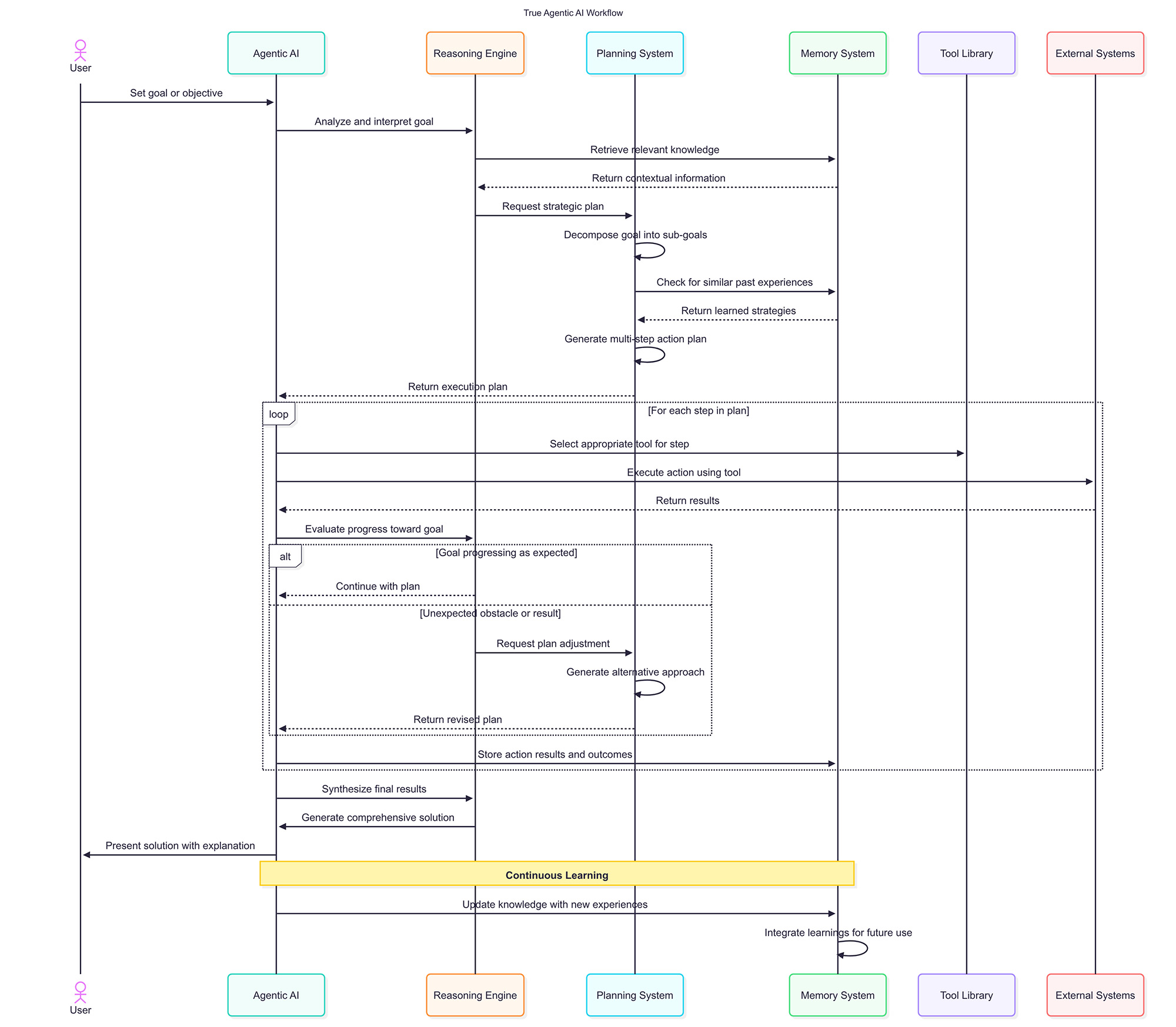
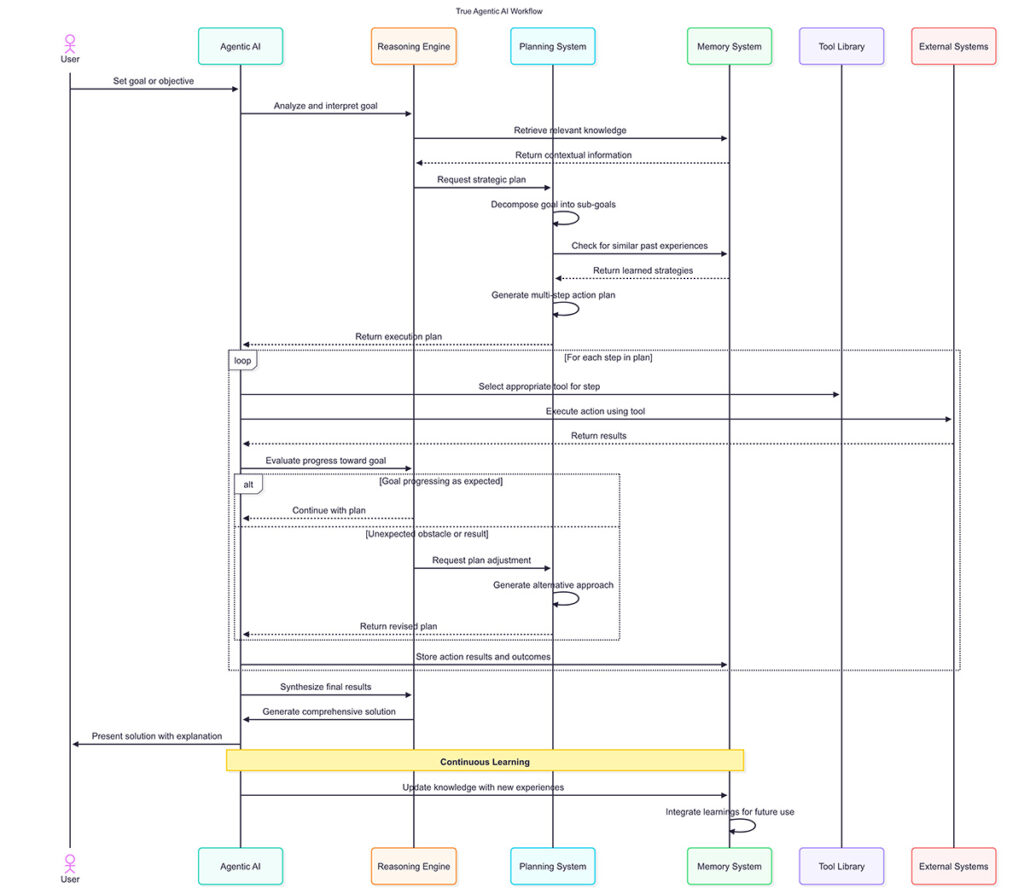
Traditional Agentic AI (see diagram below) attempts to replicate human-like reasoning with complex planning systems, goal decomposition, and continuous strategic adjustments. Notice the multiple feedback loops, reasoning engines, and decision points—this is where the “illusion of thinking” creates complexity without reliability whilst multiplying across your enterprise in ungovernable ways.
Agentic AI Sequence Diagram
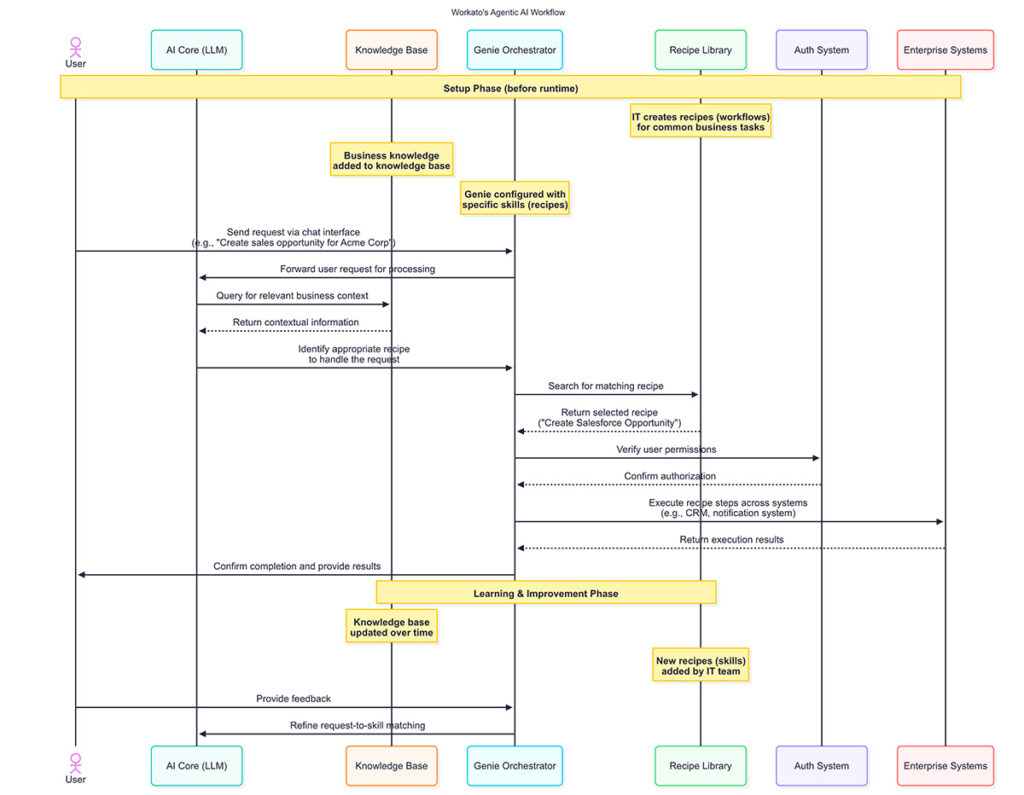
Workato’s Orchestrative Approach (see diagram below) focuses on what AI does well: understanding user intent and selecting appropriate pre-built workflows. The flow is linear, auditable, and deterministic once the recipe is selected. Most importantly, it maintains enterprise architectural coherence by keeping business logic centralised and AI distributed.
Workato Agentic AI Sequence Diagram
The business implications are stark: one approach promises sophisticated reasoning but delivers unpredictable results and architectural chaos, whilst the other delivers immediate, reliable automation that scales with your business processes whilst preserving enterprise governance.
Real Success Stories: Orchestration Without Chaos
The practical benefits become clear across different business functions:
Customer Service: Workato Genies understand customer requests and trigger appropriate support workflows—updating account information, processing refunds, or escalating to specialists. The business logic for each action is consistent across all touchpoints, preventing the discount confusion scenario.
Sales Operations: Genies interpret sales team requests and execute pre-built workflows for opportunity creation, lead qualification, or quote generation. Pricing rules are maintained centrally and applied consistently, eliminating the chaos of multiple AI agents quoting different prices.
IT Operations: Genies understand problem descriptions and trigger appropriate diagnostic and remediation workflows, delivering faster resolution times with consistent security policies enforced across all AI interactions.
In each case, AI handles what it does best whilst leaving critical business logic to proven, deterministic processes that can be audited, governed, and maintained centrally.
Workato’s Agent Studio provides centralised governance, ensuring all AI agents follow consistent patterns whilst business logic remains auditable
The Framework for AI Success and Architectural Sanity
To implement AI effectively whilst maintaining enterprise coherence, ask these key questions:
What are you asking AI to do? Understanding human intent and orchestrating existing processes represents AI’s sweet spot. Reasoning through novel problems creates both reliability issues and architectural chaos.
Where does your business logic live? In auditable, centralised systems creates maintainable consistency. Embedded in AI prompts across multiple agents creates ungovernable chaos.
How will you verify AI decisions? Pattern matching against known scenarios provides auditable decision-making. Open-ended reasoning distributed across agents becomes impossible to verify.
What happens when you need to change a business rule? Update once in the central system maintains enterprise coherence. Updating across dozens of AI implementations creates architectural nightmares.
Building on AI’s Real Strengths While Maintaining Enterprise Architecture
Smart AI implementations focus on making existing processes more accessible through natural language interfaces, reducing cognitive load through intelligent workflow selection, and democratising automation for non-technical users whilst maintaining human control over critical business logic and preserving enterprise architectural coherence.
This approach delivers immediate value whilst building a foundation for future AI advances. As capabilities evolve, the infrastructure remains valuable—you’re adding more sophisticated understanding to proven business processes whilst preventing the AI Wild West that makes enterprises ungovernable.
The Practical Path Forward
AI is genuinely transformative technology, but transformation comes from applying it correctly, not from expecting it to replace human thinking or scatter business logic across dozens of autonomous agents. The companies seeing real AI ROI today are those that enhance human capabilities whilst maintaining enterprise coherence.
Workato’s success demonstrates this approach in practice. They’ve built AI that makes complex enterprise processes as easy as having a conversation, whilst maintaining the reliability, governance, and audibility that enterprises require. Most importantly, they’ve done it in a way that strengthens rather than undermines enterprise architecture.
The lesson isn’t to avoid AI—it’s to use AI for what it’s actually good at, in ways that enhance rather than destroy your enterprise architecture. Stop asking AI to think, start asking it to orchestrate, and do it through patterns that keep your enterprise governable.
Ready to explore how orchestrative AI can transform your enterprise processes without creating architectural chaos? The conversation starts with understanding what AI can really do—and how to do it responsibly.
Ready to Transform Your Integration Strategy?
Don’t let integration challenges hold your business back. At Cloudorizon, we’ve helped organisations move from fragmented, costly approaches to streamlined automation that delivers real business value.
About Cloudorizon: We’re Workato specialists who understand that successful integration isn’t just about technology – it’s about connecting business possibilities. With 54+ enterprise clients and proven methodologies, we help organisations build integration capabilities that scale.
Questions about this article? Get in touch – we’d love to hear from you.
Picture this scenario: A customer places an order on your e-commerce site at 2 PM. In most organisations, that single transaction triggers a cascade of delays. The order system records the purchase, but inventory updates wait for the overnight batch run. Customer service sees outdated stock levels until morning. By the time all systems finally synchronise, your customer may have already rung support wondering why their order seems delayed.
These architectural limitations become competitive disadvantages when customers expect instant confirmations and immediate responsiveness.
Event-driven architecture offers a fundamentally different approach, one designed for businesses that need to act on information as it happens rather than waiting for the next batch process to complete.
Why Traditional Integration Creates Business Problems
Most enterprises still rely on integration patterns designed for a slower, more predictable world. Even with modern APIs and cloud platforms, many organisations continue using architectures that batch process data, schedule synchronisation for off-peak hours, and require manual intervention when problems occur.
These approaches worked adequately when business moved at the speed of quarterly reports and monthly reconciliations. They become competitive disadvantages when customers expect instant confirmations, real-time personalisation, and immediate problem resolution.
The Reactive Integration Problem
Even sophisticated organisations using REST APIs often fall into polling patterns that create systematic delays. Your CRM checks for new leads every 15 minutes. Inventory systems query e-commerce platforms hourly for stock updates. Customer service platforms pull ticket updates every few minutes.
This approach remains fundamentally reactive rather than responsive—systems constantly ask “has anything changed?” instead of being notified when changes actually occur. The business impact compounds: sales representatives work with outdated lead data, customer service agents see stale inventory levels, and marketing campaigns run against old customer information.
When these integrations fail—whether through API timeouts, rate limiting, or data format changes—someone has to notice, diagnose the problem, and manually restart operations. These failures often remain invisible until the impact becomes severe, creating customer friction and operational overhead.
How Event-Driven Architecture Changes Business Operations
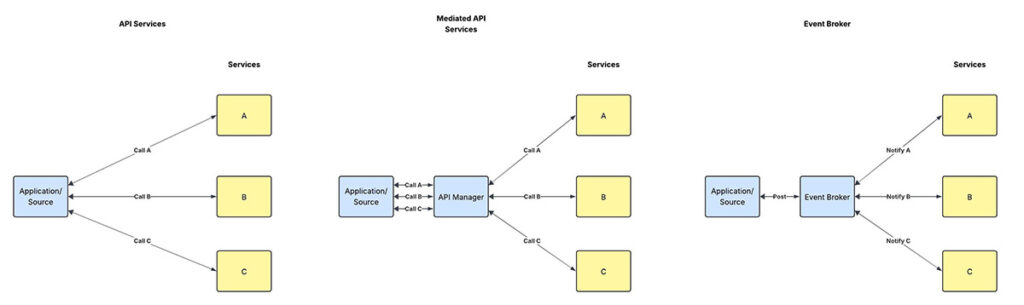
Event-driven architecture reframes system communication entirely. Instead of applications directly calling each other or waiting for scheduled synchronisation, systems communicate by publishing and consuming events—notifications that something significant has happened.
This shift from request-response to publish-subscribe patterns eliminates many traditional integration problems while enabling new business capabilities that weren’t practically possible before.
Unlike traditional point-to-point integration, event-driven systems communicate through published events, enabling loose coupling and greater agility
Immediate Response to Business Events
In an event-driven system, when that customer places their 2 PM order, the transaction immediately publishes an “order created” event. Inventory systems instantly reserve the items. Fulfilment centres begin processing immediately. Customer service sees the order status in real-time. Marketing systems update availability within seconds.
The customer receives immediate confirmation with accurate delivery estimates. The entire organisation operates with consistent, up-to-date information within seconds rather than hours. This enables business operations that were previously impractical—real-time personalisation, dynamic pricing that responds to actual demand, and proactive customer service.
Loosely Coupled System Evolution
Event-driven architectures connect systems through events rather than direct integration, fundamentally changing how businesses can evolve their technology capabilities. You can modify, replace, or add new systems without disrupting existing operations.
Need to integrate a new payment processor? Simply configure it to consume order events and publish payment events. Want to add predictive analytics? Create a new service that consumes relevant events and publishes insights. Existing systems continue operating unchanged while the business gains new capabilities.
This architectural flexibility translates directly into business agility. New market opportunities can be addressed quickly because the underlying systems adapt easily. Compliance requirements can be implemented by adding new event consumers rather than modifying existing applications. Partnership integrations become straightforward because partners can consume your business events without complex system-to-system connections.
Self-Healing Operations Through Event Architecture
Event-driven systems can handle failures gracefully through built-in resilience patterns. If a service becomes temporarily unavailable, events queue automatically and process when the service recovers. If processing fails, the system can retry automatically or route events to alternative handlers.
This resilience reduces operational overhead dramatically whilst maintaining service quality even when individual components experience problems. We’ve seen organisations reduce integration-related incidents by 70-80% after implementing event-driven patterns properly.
More importantly, this reliability enables businesses to commit to higher service levels with confidence. When your architecture handles failures gracefully, you can offer stronger guarantees to customers and partners.
The Measurable Business Impact
The advantages of event-driven architecture extend far beyond improved system performance. They translate into quantifiable business outcomes that directly affect competitiveness, customer satisfaction, and operational efficiency.
Enhanced Customer Experience
Customers increasingly expect immediate responses and consistent experiences. Event-driven architectures enable this by ensuring information flows instantly between systems. When customers update their address, that change immediately propagates everywhere. When they make purchases, recommendations update based on their latest behaviour.
One retail client saw customer satisfaction scores increase by 23% after implementing event-driven order processing, primarily because customers received accurate, real-time updates about purchases and deliveries.
Operational Agility for Competitive Advantage
Event-driven architectures enable rapid adaptation to market conditions and competitive pressures. A financial services client implemented new fraud detection rules in days rather than months because adding new event processors didn’t require modifying existing systems.
Retail organisations can adjust pricing strategies quickly because price changes automatically flow to all relevant systems through events. Marketing campaigns can incorporate real-time behavioural data because customer interactions generate events that analytics systems consume immediately.
Real-Time Decision Making
Event-driven systems provide continuous business intelligence rather than periodic snapshots. Managers can observe trends as they develop and make decisions based on current information. One manufacturing client reduced inventory carrying costs by 18% because event-driven supply chain visibility enabled just-in-time procurement based on actual rather than projected demand.
When Event-Driven Architecture Provides Maximum Value
Event-driven approaches provide the most compelling return on investment when real-time responsiveness directly impacts business outcomes, systems need to remain loosely coupled, or business processes span multiple applications requiring coordination.
Look for scenarios where delays currently create customer friction or revenue loss, where manual intervention frequently resolves integration failures, or where multiple systems need coordinated updates for business changes. Common high-value starting points include order processing workflows, customer data synchronisation, inventory management, and fraud detection systems.
Traditional integration patterns remain appropriate for simple, low-volume data transfers, stable workflows that rarely change, or resource-constrained environments where the additional complexity isn’t justified by the business benefits.
Event-driven architectures provide continuous business intelligence streams, enabling proactive decision-making based on current rather than historical information
Architecture as Competitive Strategy
In an economy where competitive advantage comes from operational excellence and immediate responsiveness, system architecture matters more than ever. Organisations that can respond immediately to events, maintain consistent information across all systems, and adapt quickly to changing requirements will systematically outperform those constrained by batch processing and tightly coupled systems.
Leading organisations are already gaining advantages through these approaches. Amazon’s recommendations update in real-time based on customer behaviour. Netflix adjusts content delivery instantly based on viewing patterns. Financial institutions detect and prevent fraud within milliseconds of suspicious transactions.
The question isn’t whether event-driven patterns will become mainstream—they already are in leading organisations. The question is whether your business will adopt these approaches proactively to gain competitive advantage, or reactively when market pressure makes traditional approaches unsustainable.
The businesses that thrive in the next decade will be those that can act on information as it happens, rather than waiting for the next batch process to complete. Event-driven architecture provides the foundation for this capability—and the choice between leading or following is yours to make.
Ready to Transform Your Integration Strategy?
Don’t let integration challenges hold your business back. At Cloudorizon, we’ve helped organisations move from fragmented, costly approaches to streamlined automation that delivers real business value.
About Cloudorizon: We’re Workato specialists who understand that successful integration isn’t just about technology – it’s about connecting business possibilities. With 54+ enterprise clients and proven methodologies, we help organisations build integration capabilities that scale.
Questions about this article? Get in touch – we’d love to hear from you.
Here’s something often overlooked about employee onboarding: the first day experience of a new hire sets the tone for their long-term engagement and determines whether they’ll recommend your company to others. Yet, many organisations continue to treat the Joiners, Movers, and Leavers (JML) process with outdated methods that fail to meet today’s expectations.
I watched a talented developer walk out after three days at a tech firm because they couldn’t access the systems they needed to do their job. Three days of sitting around, waiting for IT tickets to be resolved. That’s not just poor process design—that’s £15,000 of recruitment costs down the drain, plus the opportunity cost of delayed project delivery.
The stark reality? Organisations with automated JML processes report 60% faster onboarding times and 70% fewer access-related security incidents. But here’s what really matters: their new hires actually want to stay.
Traditional onboarding: when first impressions become lasting disappointments
The Hidden Cost of Manual Mayhem
Traditional JML processes are organisational torture chambers disguised as standard procedure. Picture this: Sarah joins as a marketing manager on Monday. HR creates her profile. IT gets a ticket (eventually). Facilities receives a separate request for desk setup. Finance processes equipment orders. Marketing waits to brief her.
Each department operates in its own silo. Nobody talks to anybody else. Sarah spends her first week chasing passwords, hunting for her laptop, and wondering if she made the right career choice.
Meanwhile, when Tom from accounting leaves, his access to financial systems remains active for two weeks because the offboarding checklist got buried in someone’s inbox. That’s not just inefficient—it’s a security nightmare waiting to happen. I once worked with a company that only discovered an ex-employee still had a company car over a year after leaving, when a new system was implemented.
The fragmentation isn’t just annoying; it’s expensive. Manual JML processes typically involve 15-20 separate tasks across five departments. Every handoff is a potential failure point. Every delay compounds employee frustration.
Beyond Efficiency: The Real Business Impact
Smart organisations have discovered that JML automation isn’t just about saving time—it’s about competitive advantage. A financial services firm I worked with transformed their onboarding from a five-day marathon into a single-day sprint. The results? Their time-to-productivity for new hires dropped by 75%.
But the security benefits are equally compelling. Automated systems don’t forget to revoke access when someone leaves. They don’t accidentally provision administrator rights to temporary contractors. They create audit trails that compliance teams actually trust.
Consider the mathematics: if manual onboarding costs an average £2,500 per employee in administrative overhead, automation can reduce that to under £500. For a company hiring 200 people annually, that’s £400,000 in direct savings—before you factor in reduced turnover and faster productivity.
The Architecture of Seamless Transitions
Effective JML automation requires more than workflow software—it demands intelligent orchestration. The best systems anticipate needs rather than simply respond to requests.
When a new hire accepts an offer, the system should automatically trigger equipment procurement, schedule workspace setup, initiate background checks, and prepare system access based on role requirements. By day one, everything’s ready. No waiting, no chasing, no frustration.
For internal moves, the complexity multiplies. Access rights need careful adjustment—removing old permissions while adding new ones, ensuring continuity of critical work, updating org charts and distribution lists. Manual processes typically take 3-5 days. Automated systems can complete role transitions in hours.
Departures require military precision. Access must be revoked immediately upon termination notification. Equipment needs recovery scheduling. Knowledge transfer sessions require coordination. Exit interviews need booking. Miss any step, and you’ve got either security exposure or legal complications.
The Integration Imperative
Here’s where most organisations stumble: they try to automate JML in isolation. That’s backwards thinking. JML automation only works when it connects everything—HR systems, identity management, asset tracking, facilities management, even learning platforms.
Modern identity systems can provision user accounts automatically based on HR data. Asset management platforms can track equipment from assignment through return. Workflow engines can orchestrate complex approval chains without human intervention.
The key is bidirectional integration. When someone changes roles in the HR system, that change should cascade through every connected system automatically. No manual updates. No missed notifications. No inconsistent data.
Measuring What Matters
You can’t improve what you don’t measure, but most organisations track the wrong JML metrics. They count completion rates while ignoring employee satisfaction. They measure processing time while overlooking security compliance.
Smart metrics focus on business outcomes: time to productivity for new hires, security incident rates during transitions, employee satisfaction scores for the onboarding experience, and total cost per JML transaction.
One manufacturing company discovered that their automated JML system reduced security incidents by 85% while improving new hire satisfaction from 3.2 to 4.7 out of 5. Those aren’t just numbers—they represent competitive advantage in a tight talent market.
The Path Forward
Start with your biggest pain point. Usually, that’s onboarding—it’s visible, measurable, and directly impacts employee experience. Design the ideal experience first, then work backwards to the technical requirements.
Pilot with a specific department or role type. Sales teams often work well because their onboarding requirements are relatively standardised, and their time-to-productivity is easily measured.
Most importantly, involve the people who’ll use the system. IT teams building JML automation in isolation typically create technically perfect solutions that nobody wants to use.
The future workplace demands seamless employee experiences. Remote work, flexible arrangements, and changing expectations mean that clunky manual processes aren’t just inefficient—they’re business-limiting.
Organisations that master JML automation don’t just save money. They create employee experiences that become competitive advantages, security postures that enable growth, and operational efficiency that funds innovation.
Your next hire deserves better than waiting three days for a laptop. Your departing employees deserve better than unclear handover processes. Your organisation deserves better than manual chaos disguised as standard procedure.
The question isn’t whether to automate JML processes. It’s whether you’ll do it before your competitors gain the advantage.
Ready to Transform Your Integration Strategy?
Don’t let integration challenges hold your business back. At Cloudorizon, we’ve helped organisations move from fragmented, costly approaches to streamlined automation that delivers real business value.
About Cloudorizon: We’re Workato specialists who understand that successful integration isn’t just about technology – it’s about connecting business possibilities. With 54+ enterprise clients and proven methodologies, we help organisations build integration capabilities that scale.
Questions about this article? Get in touch – we’d love to hear from you.
As organizations increasingly adopt Workday as their core HR system, understanding its integration capabilities becomes crucial for successful implementation and operation. This first part of our three-part series explores the fundamentals of Workday integration from a veteran HR consultant’s perspective.
Understanding Workday’s Integration Landscape
Workday offers a comprehensive suite of integration tools designed to connect with various enterprise systems. As a cloud-native platform, Workday’s approach to integration differs significantly from traditional on-premises HR systems. The platform provides several integration mechanisms, each with specific use cases and advantages.
Having worked with numerous HR systems throughout my career, I’ve found that Workday’s integration capabilities stand out for their flexibility and robustness. However, understanding when and how to use each integration method is essential for maximizing your investment.
Core Integration Methods in Workday
1. Workday Web Services (WWS)
Workday Web Services form the backbone of Workday’s integration architecture. These SOAP-based web services provide a comprehensive API layer that allows external systems to interact with Workday data and business processes. WWS supports both inbound and outbound integrations, making it versatile for various integration scenarios.
Best for: Complex integrations requiring detailed business logic, real-time data exchange, and secure transactions.
2. Enterprise Interface Builder (EIB)
The Enterprise Interface Builder is a no-code tool that allows business analysts and system administrators to create file-based integrations without programming knowledge. EIB supports various file formats, including CSV, XML, and fixed-width files, making it ideal for batch processing scenarios.
Best for: Scheduled data imports/exports, one-time data migrations, and integrations with systems that support file-based data exchange.
3. Workday Studio
Workday Studio is a graphical integration development environment that allows for more complex integration scenarios. It provides a visual canvas for designing integration processes with advanced transformation and routing capabilities.
Best for: Complex integrations requiring data transformation, conditional logic, or integration with legacy systems that don’t support modern web services.
Key Considerations for Workday Integration
When planning your Workday integration strategy, several factors should influence your approach:
Data Volume and Frequency: Consider how much data needs to be transferred and how often. Real-time integrations are ideal for critical business processes, while batch processing may be more efficient for large data volumes.
Security Requirements: Workday provides robust security features, but different integration methods offer varying levels of security control. Ensure your chosen method meets your organization’s security standards.
Technical Expertise: Assess your team’s technical capabilities. EIB requires minimal technical knowledge, while WWS and Studio demand more specialized skills.
Maintenance Overhead: Consider the long-term maintenance implications of your integration approach. Custom-coded integrations may offer flexibility but can be challenging to maintain.
Coming in Part 2
In the next installment of this series, we’ll explore advanced integration patterns for Workday, including event-driven architectures, middleware considerations, and best practices for integrating Workday with other enterprise systems. We’ll also discuss common integration challenges and how to overcome them.
Ready to Transform Your Integration Strategy?
Don’t let integration challenges hold your business back. At Cloudorizon, we’ve helped organisations move from fragmented, costly approaches to streamlined automation that delivers real business value.
About Cloudorizon: We’re Workato specialists who understand that successful integration isn’t just about technology – it’s about connecting business possibilities. With 54+ enterprise clients and proven methodologies, we help organisations build integration capabilities that scale.
Questions about this article? Get in touch – we’d love to hear from you.
In today’s fast-paced business environment, efficiency is key to maintaining a competitive edge. One area where many organizations still struggle with inefficiency is invoice processing. Manual invoice handling is not only time-consuming but also prone to errors and delays, leading to increased costs and strained vendor relationships.
“Organizations that implement automated invoice processing solutions can reduce processing costs by up to 80% and cut processing time from weeks to days or even hours.”
The Challenges of Manual Invoice Processing
Before diving into the benefits of automation, it’s important to understand the challenges associated with traditional, manual invoice processing:
Time-consuming data entry: Manual entry of invoice data into accounting systems is labor-intensive and diverts staff from more strategic tasks.
High error rates: Human errors in data entry can lead to duplicate payments, incorrect amounts, or missed payments.
Delayed approvals: Physical routing of invoices for approval often results in bottlenecks and delays.
Limited visibility: Tracking the status of invoices in a manual system is difficult, making it challenging to respond to vendor inquiries.
Storage and retrieval issues: Physical storage of paper invoices consumes space and makes retrieval for audits or inquiries cumbersome.
Key Benefits of Automated Invoice Processing
1. Reduced Processing Costs
Automated invoice processing significantly reduces the cost per invoice by eliminating manual data entry, reducing errors, and streamlining the approval workflow. Studies show that organizations can reduce processing costs by up to 80% through automation.
Cost comparison between manual and automated invoice processing
2. Improved Accuracy and Reduced Errors
Automation technologies like OCR (Optical Character Recognition) and machine learning can extract data from invoices with high accuracy, significantly reducing errors compared to manual data entry. This leads to fewer exceptions, disputes, and reconciliation issues.
3. Faster Processing Times
Automated systems can process invoices in minutes rather than days or weeks. This speed enables organizations to take advantage of early payment discounts and avoid late payment penalties, improving cash flow management.
4. Enhanced Visibility and Control
Digital invoice processing provides real-time visibility into the status of every invoice. Finance teams can easily track where invoices are in the approval workflow, identify bottlenecks, and respond promptly to vendor inquiries.
5. Better Compliance and Audit Readiness
Automated systems maintain a complete digital audit trail of all invoice-related activities, making it easier to comply with regulatory requirements and prepare for audits. Digital storage also eliminates the risk of lost or misplaced documents.
Key Components of an Automated Invoice Processing Solution
An effective automated invoice processing solution typically includes the following components:
Invoice capture: Digital receipt of invoices via email, supplier portals, or scanning of paper invoices.
Data extraction: OCR and AI technologies to extract key data points from invoices.
Validation and matching: Automated verification of invoice data against purchase orders and receiving documents.
Approval workflow: Digital routing of invoices to appropriate approvers based on predefined rules.
Integration with ERP/accounting systems: Seamless transfer of approved invoice data to financial systems.
Analytics and reporting: Insights into processing metrics, vendor performance, and spending patterns.
Case Study: Manufacturing Company Transforms AP Operations
A mid-sized manufacturing company implemented an automated invoice processing solution and achieved the following results within six months:
Reduced invoice processing time from 14 days to 3 days
Decreased processing cost per invoice from $15 to $3
Improved early payment discount capture by 30%
Reduced invoice exceptions by 60%
Implementation Considerations
When implementing an automated invoice processing solution, consider the following factors:
Current process assessment: Thoroughly analyze your existing invoice processing workflow to identify pain points and opportunities for improvement.
Solution selection: Choose a solution that aligns with your organization’s size, invoice volume, and integration requirements.
Change management: Develop a comprehensive change management plan to ensure smooth adoption by AP staff and approvers.
Vendor onboarding: Communicate changes to vendors and provide guidance on submitting invoices in the preferred format.
Performance metrics: Establish key performance indicators to measure the success of your automation initiative.
Conclusion
Automated invoice processing represents a significant opportunity for organizations to improve efficiency, reduce costs, and enhance control over their accounts payable operations. By eliminating manual tasks, reducing errors, and accelerating processing times, automation enables finance teams to focus on more strategic activities that add value to the business.
As technology continues to evolve, the capabilities of invoice automation solutions will only become more sophisticated, offering even greater benefits to organizations willing to embrace digital transformation in their finance operations.
Ready to Transform Your Integration Strategy?
Don’t let integration challenges hold your business back. At Cloudorizon, we’ve helped organisations move from fragmented, costly approaches to streamlined automation that delivers real business value.
About Cloudorizon: We’re Workato specialists who understand that successful integration isn’t just about technology – it’s about connecting business possibilities. With 54+ enterprise clients and proven methodologies, we help organisations build integration capabilities that scale.
Questions about this article? Get in touch – we’d love to hear from you.
As organisations accelerate their digital transformation initiatives, the need for robust integration solutions has never been more critical. Two popular approaches have emerged to address these integration challenges: Integration Platform as a Service (iPaaS) and Hybrid Integration Platforms. This article provides a comprehensive comparison to help you determine which solution best fits your organization’s needs.
“By 2025, over 65% of large organisations will have implemented either an iPaaS or hybrid integration platform to support their digital transformation initiatives.”
What is iPaaS?
Integration Platform as a Service (iPaaS) is a cloud-based platform that enables organizations to connect applications, data, and processes across different environments. iPaaS solutions are typically fully managed by the vendor, providing a comprehensive set of integration capabilities delivered as a service.
Key Characteristics of iPaaS
Cloud-native architecture: Built for and deployed in the cloud
Subscription-based pricing: Pay-as-you-go model with minimal upfront investment
Pre-built connectors: Extensive library of connectors for popular applications and services
Low-code/no-code interfaces: Visual development tools for building integrations
Managed infrastructure: Vendor handles maintenance, updates, and scaling
Typical iPaaS architecture connecting cloud and SaaS applications
What is a Hybrid Integration Platform?
A Hybrid Integration Platform (HIP) is designed to connect applications, data, and processes across both cloud and on-premises environments. HIPs provide a more flexible deployment model, allowing organisations to maintain certain integration components on-premises while leveraging cloud capabilities for others.
Key Characteristics of Hybrid Integration Platforms
Flexible deployment options: Can be deployed on-premises, in the cloud, or in a hybrid model
Support for legacy systems: Strong capabilities for integrating with traditional on-premises applications
Advanced security features: Enhanced control over sensitive data and compliance requirements
Scalable architecture: Can handle high-volume, mission-critical integrations
Comprehensive governance: Robust tools for monitoring, managing, and securing integrations
Comparative Analysis: iPaaS vs. Hybrid Integration Platforms
1. Deployment Model
iPaaS: Primarily cloud-based, with limited or no on-premises components. This model offers rapid deployment and minimal infrastructure management but may present challenges for organizations with strict data residency requirements.
Hybrid Integration Platform: Offers flexible deployment options across cloud and on-premises environments. This flexibility allows organizations to keep sensitive data and critical integrations on-premises while leveraging cloud capabilities for other scenarios.
2. Integration Capabilities
iPaaS: Excels at cloud-to-cloud and SaaS integrations with extensive pre-built connectors. May have limitations when integrating with legacy systems or handling complex integration patterns.
Hybrid Integration Platform: Provides comprehensive integration capabilities across cloud, on-premises, and legacy systems. Typically offers more advanced integration patterns, data transformation, and protocol support.
Capability Comparison Table
Capability
iPaaS
Hybrid Integration Platform
Cloud-to-Cloud Integration
Excellent
Good
Legacy System Integration
Limited
Excellent
API Management
Good
Excellent
B2B Integration
Limited
Excellent
Event Processing
Good
Excellent
3. Scalability and Performance
iPaaS: Offers elastic scalability for varying workloads, but may face performance challenges with high-volume, mission-critical integrations or when dealing with large data transfers between cloud and on-premises systems.
Hybrid Integration Platform: Designed to handle enterprise-scale integration requirements with robust performance for high-volume transactions and data processing. The ability to place integration runtimes close to data sources can significantly improve performance.
4. Security and Compliance
iPaaS: Provides standard security features but may present challenges for organizations in highly regulated industries with strict data sovereignty requirements.
Hybrid Integration Platform: Offers enhanced security controls and compliance capabilities, allowing organizations to keep sensitive data on-premises while still leveraging cloud integration capabilities.
5. Total Cost of Ownership
iPaaS: Lower upfront costs with subscription-based pricing, but costs can increase as integration volume grows. Minimal infrastructure and operational overhead.
Hybrid Integration Platform: Higher initial investment, especially if on-premises infrastructure is required. May offer better long-term cost efficiency for organizations with extensive integration needs.
Use Case Scenarios
When to Choose iPaaS
Cloud-first organizations: Companies with primarily cloud-based applications and minimal on-premises footprint
Limited IT resources: Organisations with constrained IT teams that benefit from a fully managed service
Departmental or line-of-business integrations: Scenarios where business users need to create integrations with minimal IT involvement
When to Choose a Hybrid Integration Platform
Complex hybrid environments: Organizations with significant investments in both cloud and on-premises applications
Regulated industries: Companies in healthcare, finance, or government with strict data residency and compliance requirements
Mission-critical integrations: Scenarios requiring high performance, reliability, and control
Legacy system dependencies: Organizations with critical legacy systems that must be integrated into modern digital processes
Decision framework for selecting the right integration platform
Future Trends in Integration Platforms
As integration technologies continue to evolve, we’re seeing several emerging trends that will shape the future of both iPaaS and Hybrid Integration Platforms:
AI-powered integration: Machine learning capabilities to automate mapping, suggest integration patterns, and optimize performance
Event-driven architectures: Enhanced support for real-time, event-based integration patterns
Low-code expansion: More sophisticated low-code capabilities enabling business users to create complex integrations
Edge integration: Support for integration at the edge to handle IoT and distributed computing scenarios
Convergence of iPaaS and HIP: Blurring of lines between these categories as vendors expand capabilities in both directions
Conclusion
Choosing between iPaaS and a Hybrid Integration Platform depends on your organization’s specific requirements, existing infrastructure, and long-term digital strategy. While iPaaS offers simplicity, agility, and lower upfront costs, Hybrid Integration Platforms provide greater flexibility, control, and enterprise-grade capabilities.
Many organizations are adopting a pragmatic approach by implementing iPaaS for certain use cases while leveraging Hybrid Integration Platforms for more complex scenarios. This hybrid strategy allows them to balance agility with control, addressing both immediate integration needs and long-term strategic requirements.
As you evaluate integration platforms, consider not only your current needs but also how your integration requirements will evolve as your digital transformation journey progresses. The right platform should support your immediate integration challenges while providing a foundation for future growth and innovation.
Ready to Transform Your Integration Strategy?
Don’t let integration challenges hold your business back. At Cloudorizon, we’ve helped organisations move from fragmented, costly approaches to streamlined automation that delivers real business value.
About Cloudorizon: We’re Workato specialists who understand that successful integration isn’t just about technology – it’s about connecting business possibilities. With 54+ enterprise clients and proven methodologies, we help organisations build integration capabilities that scale.
Questions about this article? Get in touch – we’d love to hear from you.
Modern HR departments face unprecedented challenges managing multiple systems across employee lifecycles. As organizations adopt specialized tools for recruitment, onboarding, performance management, and more, HR ecosystems have become increasingly fragmented. This article explores how integration strategies can transform this chaos into cohesive, efficient workflows.
The Fragmented HR Landscape
Today’s HR departments typically manage between 7-10 different systems, each serving a specific function in the employee lifecycle. This fragmentation creates several challenges:
Data Silos: Critical employee information becomes trapped in disconnected systems
Manual Processes: HR teams spend valuable time on data entry and reconciliation
Inconsistent Data: Information discrepancies lead to errors and compliance risks
Poor Employee Experience: Disjointed systems create frustrating experiences for employees
“The average HR department uses 9.1 different systems, yet 67% of HR leaders report they struggle to extract meaningful insights from their fragmented data.”
— HR Technology Survey, 2024
The Evolution of HR Systems
To understand how we arrived at this fragmented landscape, it’s helpful to trace the evolution of HR systems:
Phase 1: Centralized HRIS (1990s-2000s)
Early HR systems were monolithic platforms that attempted to handle all HR functions. While they provided centralization, they often lacked depth in specialized areas and were difficult to customize.
Phase 2: Best-of-Breed Explosion (2010s)
Cloud computing enabled the rise of specialized HR applications focused on specific functions like recruitment, performance management, and learning. Organizations began adopting these best-of-breed solutions to gain deeper capabilities, but at the cost of creating disconnected systems.
Phase 3: Integration Imperative (Present)
Organizations now recognize that neither a single monolithic system nor a collection of disconnected specialized tools is optimal. The focus has shifted to creating integrated HR ecosystems that combine the depth of specialized applications with seamless data flow and user experiences.
Building a Cohesive HR Ecosystem
Transforming a fragmented HR landscape into a cohesive ecosystem requires a strategic approach to integration. Here are the key elements:
1. Core System Strategy
Most successful HR ecosystems are built around a core system that serves as the system of record for essential employee data. Common choices include:
HCM Suites: Platforms like Workday, Oracle HCM, or SAP SuccessFactors
HRIS Platforms: Systems like BambooHR, Personio, or Rippling
ERP Systems: For organizations using enterprise-wide platforms with HR modules
The core system maintains the “golden record” of employee data and provides a foundation for integration with specialized applications.
2. Integration Architecture
Several approaches can be used to connect HR systems:
Point-to-Point Integration: Direct connections between systems. Simple to implement initially but becomes complex and difficult to maintain as the number of systems grows.
Integration Platform (iPaaS): A centralized platform that manages connections between multiple systems. More scalable and maintainable than point-to-point integration.
API-First Approach: Leveraging modern APIs to create flexible, standardized connections between systems.
HR Integration Hub: A specialized middleware layer designed specifically for HR data and processes.
3. Data Governance
Effective integration requires clear data governance to ensure consistency and accuracy:
Master Data Management: Establishing which system is authoritative for each data element
Data Standards: Defining formats, validation rules, and taxonomies
Change Management: Processes for handling updates that affect multiple systems
Data Quality: Monitoring and improving data accuracy across the ecosystem
4. User Experience Layer
Even with backend integration, users may still need to navigate multiple interfaces. A unified user experience can be created through:
Employee Portals: Centralized access points for HR services
Single Sign-On: Seamless authentication across multiple systems
Workflow Automation: Cross-system processes that guide users through complex tasks
Mobile Experiences: Consistent access to HR functions on mobile devices
“The most successful HR transformations focus not just on implementing new technologies, but on creating seamless experiences that make HR processes invisible to employees and managers.”
— HR Technology Consultant
Case Study: Global Financial Services Firm
A global financial services firm with 25,000 employees was struggling with a fragmented HR landscape that included:
Workday as their core HCM system
Specialized recruitment, onboarding, and learning platforms
Legacy systems for compensation and benefits
Regional HR systems due to acquisitions
The fragmentation resulted in:
HR teams spending 30% of their time on manual data reconciliation
Onboarding processes that took 3-4 weeks to complete
Compliance risks due to inconsistent employee data
Poor employee satisfaction with HR services
Their transformation approach included:
Implementing an iPaaS solution to connect their HR systems
Establishing Workday as the authoritative source for core employee data
Creating automated workflows for key processes like onboarding and transfers
Developing an employee portal that provided a unified interface
The results were significant:
70% reduction in manual data entry and reconciliation
Onboarding time reduced to 1 week
Improved data accuracy and compliance
30% increase in employee satisfaction with HR services
HR team refocused on strategic initiatives rather than administrative tasks
Future Trends in HR Ecosystem Integration
As HR ecosystems continue to evolve, several trends are emerging:
1. AI-Powered Integration
Artificial intelligence is increasingly being used to enhance integration:
Automated data mapping and transformation
Anomaly detection for data quality issues
Predictive analytics across integrated data sources
Natural language interfaces that work across multiple systems
2. Composable HR Architecture
The concept of “composable HR” is gaining traction, where organizations:
Build HR capabilities from modular, interchangeable components
Use APIs and microservices to create flexible connections
Adapt their HR ecosystem quickly as needs change
Combine best-of-breed functionality with seamless integration
3. Employee-Centric Design
Integration is increasingly focused on creating seamless employee experiences:
Journey-based integration that follows employee lifecycles
Contextual experiences that anticipate employee needs
Conversational interfaces that hide system complexity
Mobile-first design for anywhere, anytime access
Conclusion: From Chaos to Cohesion
The evolution of HR ecosystems reflects a broader trend in enterprise technology: the move from monolithic systems to specialized applications and now to integrated ecosystems. Organizations that successfully navigate this evolution can transform the chaos of fragmented HR systems into the cohesion of a well-orchestrated ecosystem.
The benefits extend beyond operational efficiency to strategic advantage. When HR teams are freed from manual data management, they can focus on initiatives that drive business value. When employees experience seamless HR processes, they can focus on their work rather than administrative hurdles. And when leaders have comprehensive workforce insights, they can make better decisions about their most valuable asset: their people.
The journey from fragmentation to integration is not simple, but the organizations that make this transformation are positioning themselves for success in an increasingly competitive talent landscape.
Ready to Transform Your Integration Strategy?
Don’t let integration challenges hold your business back. At Cloudorizon, we’ve helped organisations move from fragmented, costly approaches to streamlined automation that delivers real business value.
About Cloudorizon: We’re Workato specialists who understand that successful integration isn’t just about technology – it’s about connecting business possibilities. With 54+ enterprise clients and proven methodologies, we help organisations build integration capabilities that scale.
Questions about this article? Get in touch – we’d love to hear from you.
Data reconciliation is a critical process for ensuring data accuracy and consistency across multiple systems. However, traditional manual reconciliation processes are time-consuming, error-prone, and inefficient. This article explores how automation and integration can streamline data reconciliation processes, reducing errors and freeing up valuable resources.
The Data Reconciliation Challenge
In today’s complex business environment, organizations typically manage data across multiple systems and platforms. This distributed approach creates significant challenges when it comes to ensuring data consistency and accuracy. Data reconciliation—the process of comparing data sets from different sources to identify and resolve discrepancies—has become a critical but often burdensome task.
Common data reconciliation challenges include:
Time-Intensive Manual Processes: Many organizations still rely on spreadsheets and manual comparisons
Error-Prone Workflows: Manual reconciliation introduces human error risks
Resource Drain: Skilled staff spend valuable time on repetitive tasks
Delayed Insights: Manual processes extend the time to identify and resolve discrepancies
Compliance Risks: Inadequate reconciliation can lead to regulatory issues
“Organizations spend an average of 18 hours per week on manual data reconciliation tasks, with finance teams often dedicating up to 30% of their time to these activities.”
— Financial Operations Benchmark Report, 2024
The Business Impact of Inefficient Reconciliation
The costs of inefficient reconciliation processes extend far beyond the immediate resource allocation:
1. Financial Implications
Inefficient reconciliation directly impacts the bottom line through:
Labor costs for manual reconciliation activities
Opportunity costs of skilled resources diverted from value-adding activities
Financial losses from undetected errors and discrepancies
Increased friction between departments due to data discrepancies
Compromised decision-making based on inconsistent data
3. Strategic Limitations
At a strategic level, poor reconciliation processes can:
Undermine digital transformation initiatives
Limit the organization’s ability to leverage data as a strategic asset
Reduce confidence in data-driven decision making
Create barriers to scaling operations efficiently
Transforming Reconciliation Through Automation and Integration
Modern approaches to data reconciliation leverage automation and integration to overcome traditional challenges. Here’s how organizations are transforming their reconciliation processes:
1. Automated Data Extraction and Comparison
Automation tools can:
Extract data from multiple sources automatically
Apply consistent matching rules across large datasets
Identify discrepancies with greater accuracy than manual processes
Scale to handle growing data volumes without proportional resource increases
2. Real-Time Reconciliation
Moving from periodic to continuous reconciliation:
Integration enables near real-time data comparison
Discrepancies are identified as they occur rather than days or weeks later
Issues can be resolved before they compound or impact other processes
Continuous monitoring provides greater confidence in data accuracy
3. Exception-Based Workflows
Focusing human attention where it’s most valuable:
Automated systems handle routine matching
Staff focus only on exceptions that require human judgment
Intelligent categorization of exceptions streamlines resolution
Root cause analysis becomes more effective with structured exception data
4. Integration-Driven Reconciliation
Leveraging integration platforms to enhance reconciliation:
Direct system-to-system connections reduce data transfer errors
Standardized data formats eliminate transformation discrepancies
Centralized reconciliation hubs provide a single source of truth
“Organisations that implement automated reconciliation solutions typically see a 70-85% reduction in manual effort, 60% faster resolution of discrepancies, and up to 95% improvement in accuracy.”
— Digital Finance Transformation Study, 2024
Case Study: Financial Services Firm
A mid-sized financial services firm was struggling with their reconciliation processes across multiple systems:
Core banking system
Investment management platform
Customer relationship management system
General ledger and accounting software
Regulatory reporting tools
Their challenges included:
A team of 5 full-time employees dedicated to manual reconciliation
Monthly close process taking 7-10 business days
Frequent errors requiring rework and adjustments
Limited visibility into reconciliation status
Growing regulatory pressure for more frequent reconciliation
Their transformation approach included:
Implementing an automated reconciliation platform
Creating direct integrations between key systems
Developing standardized data formats and matching rules
Establishing exception-based workflows with clear ownership
Building dashboards for reconciliation status and metrics
The results were significant:
80% reduction in manual reconciliation effort
Monthly close reduced from 7-10 days to 3 days
99.8% accuracy in reconciled data
Real-time visibility into reconciliation status
Redeployment of 4 team members to value-adding analytical roles
Enhanced regulatory compliance with more frequent reconciliation
Implementation Approach: A Roadmap for Success
Transforming reconciliation processes requires a structured approach. Here’s a roadmap for organizations looking to streamline their reconciliation:
1. Assessment and Mapping
Begin with a thorough assessment of current reconciliation processes:
Document all reconciliation activities and their frequency
Map data flows between systems that require reconciliation
Quantify the time and resources currently dedicated to reconciliation
Identify high-priority reconciliation processes based on risk and effort
2. Solution Design
Design a solution that addresses your specific reconciliation needs:
Define standardized data formats and matching rules
Establish thresholds for automatic matching vs. exceptions
Design integration points between source systems
Create exception handling workflows with clear ownership
3. Technology Selection
Select appropriate technologies to support your reconciliation strategy:
Dedicated reconciliation platforms for complex, high-volume needs
Integration platforms (iPaaS) for connecting disparate systems
RPA (Robotic Process Automation) for automating manual steps
Analytics tools for monitoring and reporting on reconciliation
4. Phased Implementation
Implement the solution in phases to manage risk and demonstrate value:
Start with a pilot for a high-impact, manageable reconciliation process
Refine the approach based on pilot results
Gradually expand to additional reconciliation processes
Continuously optimize based on metrics and feedback
5. Change Management
Address the human side of the transformation:
Train staff on new tools and processes
Communicate the benefits and rationale for the changes
Develop new skills for exception handling and analysis
Recognize and celebrate early successes
Future Trends in Reconciliation
As technology continues to evolve, several trends are shaping the future of reconciliation:
1. AI and Machine Learning
Advanced algorithms are enhancing reconciliation through:
Pattern recognition for complex matching scenarios
Predictive analytics to anticipate reconciliation issues
Continuous learning to improve matching accuracy over time
Natural language processing for unstructured data reconciliation
2. Blockchain and Distributed Ledger Technology
Emerging technologies are changing the reconciliation paradigm:
Shared ledgers eliminating the need for traditional reconciliation
Smart contracts automating agreement between parties
Integration with operational processes for seamless workflows
Conclusion: From Burden to Strategic Advantage
Data reconciliation doesn’t have to be a burden. By leveraging automation and integration, organizations can transform reconciliation from a resource-intensive necessity to a strategic advantage. Streamlined reconciliation processes not only reduce costs and errors but also enable faster decision-making, improved compliance, and greater confidence in data integrity.
As data volumes continue to grow and business environments become more complex, the organizations that invest in modern reconciliation approaches will gain a significant competitive advantage. They’ll spend less time comparing data and more time leveraging it for business value.
The journey to streamlined reconciliation may require initial investment and change, but the returns—in efficiency, accuracy, and strategic capability—make it well worth the effort.
Ready to Transform Your Integration Strategy?
Don’t let integration challenges hold your business back. At Cloudorizon, we’ve helped organisations move from fragmented, costly approaches to streamlined automation that delivers real business value.
About Cloudorizon: We’re Workato specialists who understand that successful integration isn’t just about technology – it’s about connecting business possibilities. With 54+ enterprise clients and proven methodologies, we help organisations build integration capabilities that scale.
Questions about this article? Get in touch – we’d love to hear from you.
In today’s digital landscape, countless organizations are investing heavily in integration platforms, hoping to solve their integration challenges with the latest technology. Yet, many find themselves struggling to achieve the transformative results they anticipated. Why? Because they’re missing the secret sauce of integration success.
Why Cloudorizon’s Approach is Different
Unlike typical integration companies that focus solely on technical implementations, Cloudorizon brings a unique perspective born from our Enterprise Architecture heritage. Having architected and implemented complex business systems throughout our careers, we see integration challenges through a different lens. While others might view integration as a purely technical challenge, our Enterprise Architecture background means we understand how integration fits into the bigger picture of your organization’s technology landscape and business strategy.
Beyond the Technology Trap
Here’s a hard truth that our enterprise experience has taught us: buying the newest, shiniest integration platform isn’t enough. Many integration vendors will try to convince you that their platform is the answer to all your problems. But at Cloudorizon, we’ve learned through implementing countless business systems that successful integration capabilities are built on three fundamental pillars: People, Process, and Technology.
The Three Pillars of Integration Success: An Enterprise Architecture Perspective
1. PeopleOur Enterprise Architecture background has taught us that the human element is crucial. You need:
Skilled teams who understand both integration patterns and business context
Clear governance roles that align with enterprise objectives
Well-trained staff who can bridge the gap between business needs and technical solutions
A culture of collaboration between IT and business units
2. ProcessStrong processes are the backbone of integration success:
Enterprise-grade standardized integration patterns and templates
Business-aligned security protocols and ownership models
Streamlined operational workflows that consider organizational dynamics
Robust incident management and escalation procedures
Comprehensive release management processes that work at scale
3. TechnologyOur implementation expertise helps us ensure technology choices are:
Strategically aligned with enterprise architecture goals
Cloud-first where possible, but pragmatic about hybrid solutions
Focused on simplicity and reusability across the organization
Built with future scalability and enterprise growth in mind
Seamlessly integrated with your existing systems landscape
The Real Benefits of a Strategic Integration Capability
When these three pillars work in harmony, organizations achieve:
Reduced integration costs through enterprise-wide standardization and reuse
Faster time-to-market for new initiatives
Improved data accessibility across the enterprise
Enhanced ability to innovate with AI and ML
Better partner collaboration and information sharing
Streamlined operations for both IT and business teams
Why Many Organizations Struggle
Most integration initiatives falter because they’re led by vendors or consultants who lack comprehensive enterprise experience. They focus solely on implementing new technology without understanding how it fits into the broader organizational context. Our Enterprise Architecture background means we understand the full complexity of your business landscape.
The Cloudorizon Difference: Enterprise Architecture Meets Integration Excellence
This is where Cloudorizon stands apart. We understand that successful integration isn’t just about technology – it’s about building a comprehensive integration capability that aligns with your enterprise architecture. We offer two powerful approaches:
1. Build Your Own CapabilityWe help you develop your internal integration capability, leveraging our enterprise architecture expertise to establish:
Enterprise-grade process models and templates
Security frameworks that align with organizational standards
Common component management strategies
Team guidelines and governance that work at scale
Release management procedures that consider your full technology landscape
Incident management workflows that align with enterprise operations
2. Be Your CapabilityFor organizations that prefer to focus on their core business, we can serve as your complete integration capability, bringing deep implementation experience to:
Design low-complexity, enterprise-grade solutions
Implement cloud-first approaches that make business sense
Leverage out-of-the-box solutions effectively
Make value-oriented decisions based on enterprise context
Create future-proof architecture that scales with your business
The Path to Integration Success
Whether you choose to build your own capability or partner with us, the key is understanding that successful integration requires a holistic, enterprise-wide perspective. It’s about creating an environment where people are empowered, processes are optimized, and technology is leveraged effectively – all while maintaining alignment with your broader enterprise architecture.
Ready to Transform Your Integration Strategy?
Don’t let integration challenges hold your business back. At Cloudorizon, we’ve helped organisations move from fragmented, costly approaches to streamlined automation that delivers real business value.
About Cloudorizon: We’re Workato specialists who understand that successful integration isn’t just about technology – it’s about connecting business possibilities. With 54+ enterprise clients and proven methodologies, we help organisations build integration capabilities that scale.
Questions about this article? Get in touch – we’d love to hear from you.